Sounds and the voice
Checked with app version1.0.63· Last updated
The app has a sound for each moment of a session, so you can follow it by ear while you hang.
Where the sound settings are
- Profile, then Settings, under Sound.
- During a session: the round speaker button, next to the pause button. The session’s clock stops while you choose.
The sound settings stay on your phone. On a new phone, set them again.
Three modes
Workout sounds has three choices:
- Off: no sound.
- Tones: short tones. It is the choice at the start.
- Tones and voice: the tones, and a voice. The voice says the end of a set and the end of the session in place of their tones.
What each tone means
You can hear every sound in the app: open Hear the sounds in the sound settings, and tap the round button next to a sound to play it.
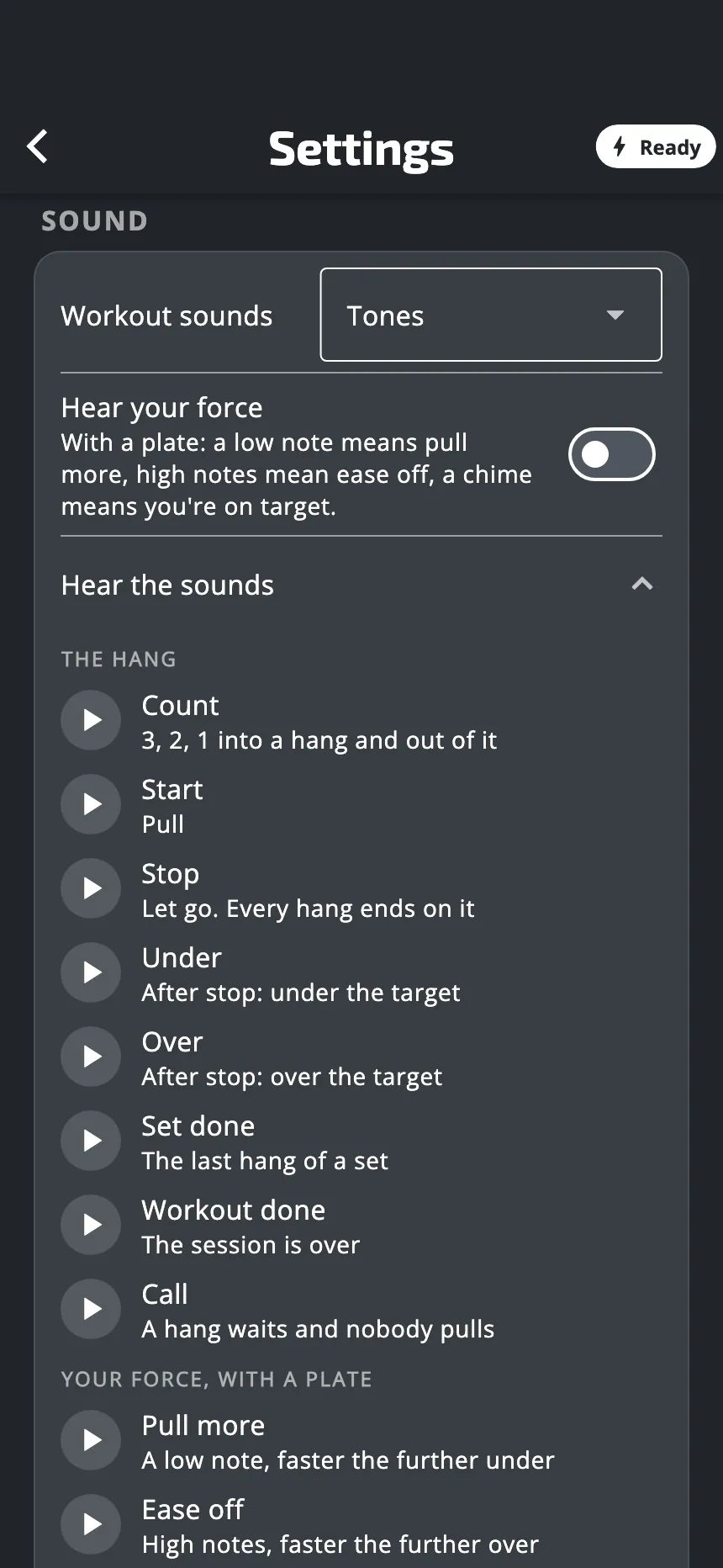
| Sound | When | What it means |
|---|---|---|
| Count | The last 3 seconds of a rest, before a hang, and the last 3 seconds of a hang | 3, 2, 1 |
| Start | A hang begins | Pull |
| Stop | A hang ends | Let go |
| Under | Just after the stop | You were under the target |
| Over | Just after the stop | You were over the target |
| Set done | After the last hang of a set (with the voice: words) | The set is done |
| Workout done | At the end (with the voice: words) | The session is over |
| Call | A hang waits and you are not pulling | The app is waiting for you |
When a workout starts straight on a hang, that first hang has no start tone. With the voice, you hear “Pull”.
In a plan, the rest between two workouts of a day has its own sounds: a tick as it nears its end, then a tone at its end.
Call. With the plate, a hang waits for your pull. If you do not pull, the app plays the call several times, with longer and longer pauses. Then it waits in silence.
The voice
With Tones and voice, a voice says “Get ready” before a hang, when the rest is long enough. It adds the name of the exercise when the exercise changes. It says when to pull and when to rest at the start of a set, and after a long rest. In a run of short repeats, you hear the tones only. The voice also says “Halfway” in the middle of a long set, “Last one” before the last hang of a set, “Set done” at the end of a set, and a closing sentence at the end of the session.
Choose a voice. When you choose Tones and voice, a new row shows: Voice. The app offers five voices in English:
- Upbeat, the voice at the start
- Calm
- Clear
- Lively
- Relaxed
Choose a voice in the list: the app says a short sentence with it. In French the app has five French voices. The voice speaks the language of the app: to change it, change the language of the app. See Units and language.
If the voice has no recording for a word, for example the name of an exercise you made, the phone’s own voice says it.
Hear your force
Hear your force adds sounds that follow your force during a hang that has a target.
- A low note: pull more. The further you are under the target, the faster it repeats.
- High notes: ease off. The further you are over the target, the faster they repeat.
- A chime: you are on target.
With the voice on, the voice also says “Pull more” and “Ease off”.
The start of each hang is silent, to let you get to the target. The switch is greyed out when Workout sounds is Off.
The first time you start a workout with targets with the plate connected, the app asks if you want these sounds. You can change your answer at any time with the switch. They need the plate: on the timer, there is no force to follow. They are not played during a test.
With your music
- The sounds play over your music. The app does not pause it and does not lower it. One exception: on Android, the call lowers your music while it plays.
- The app has no volume of its own. The sounds are as loud as your phone’s volume.
- The app does not vibrate for the sounds of a hang. It vibrates when the rest between two workouts of a plan day is over, if the app is open.
If you hear nothing
- Check Workout sounds: it must not be Off.
- Turn the phone’s volume up.
- For the sounds that follow your force: check that Hear your force is on, that the plate is connected, and that the workout has targets.
Was this helpful?
Thank you. It tells us which articles to improve.